The Building Blocks of Programming 2

Introduction
This is Part 2 of The Building Blocks of Programming. If you haven’t read Part 1 yet, start there. it covers data types, variables, constants, comments, and operators.
In this post we’ll build on that foundation and cover the concepts that make programs actually useful: making decisions, repeating actions, and storing collections of data.
To follow along with the code examples, go to onlineGDB to run C code in your browser.
Functions
A function is a block of code that you can reuse as many times as you need. Instead of repeating the same code, you write it once in a function and call it whenever you want.
Here’s the basic syntax for declaring a function:
void function_name() {
    printf("Hello from function");
}
The word before the function name is the return type, it declares what kind of value the function gives back. void means it gives back nothing. You’ll see other return types in the Return Types section below.
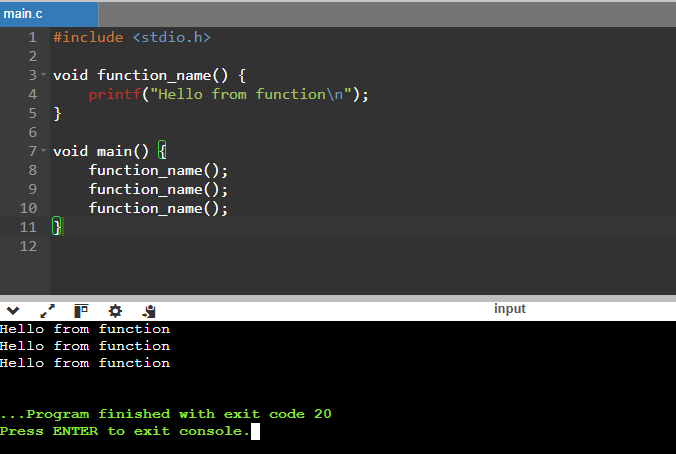
Calling it three times will print the message three times:
#include <stdio.h>

void function_name() {
    printf("Hello from function\n");
}

void main() {
    function_name();
    function_name();
    function_name();
}
This is the result:
Moving code into a function is useful, but often you also need to pass data into it. That’s what parameters are for, they go inside the parentheses of the function declaration.
Each parameter follows the same pattern as a variable declaration: data type first, then the name used inside the function:
void show_user_information(int age, char initial, float money) {
    // ... the function body goes here
}
The // ... is just a placeholder, it means “code will go here.” It’s not something you’d type in a real program.
Once the parameters are declared, they can be used anywhere inside the function:
void show_user_information(int age, char initial, float money) {
    printf("--------------USER INFO:--------------- \n");
    printf("Your initial is: %c \n", initial);
    printf("You are %d years old \n", age);
    printf("You have $%f USD \n", money);
    printf("--------------------------------------- \n");
}
So calling that function would be:
int my_age = 20;
char name_initial_letter = 'D';
float money_available = 10.90;
show_user_information(my_age, name_initial_letter, money_available );
There are some very important things to notice:
- The values you pass when calling a function are called arguments.
- The order of arguments matters — they’re matched to parameters in the same order they appear.
- The parameter names inside the function don’t need to match the variable names outside, they’re just local identifiers used within the function. You can even skip variables entirely and pass values directly:
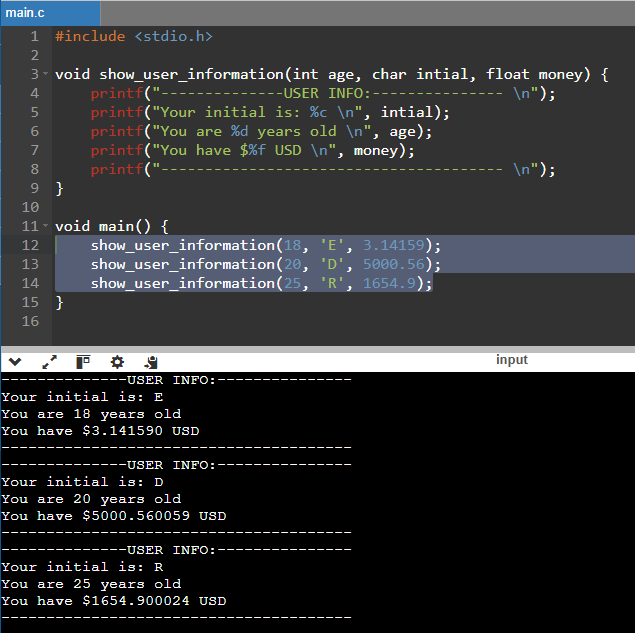
show_user_information(18, 'E', 3.14159);Here’s the complete working program putting it all together:
#include <stdio.h>

void show_user_information(int age, char initial, float money) {
    printf("--------------USER INFO:--------------- \n");
    printf("Your initial is: %c \n", initial);
    printf("You are %d years old \n", age);
    printf("You have $%f USD \n", money);
    printf("--------------------------------------- \n");
}

void main() {
    show_user_information(18, 'E', 3.14159);
    show_user_information(20, 'D', 5000.56);
    show_user_information(25, 'R', 1654.9);
}
Return Types
Every function in C has a return type, it declares what kind of value the function gives back when it finishes. You’ve already seen void, which means “gives back nothing.” But functions can also return a value, and the return type works exactly like the data types you already know.
Here’s a function that adds two numbers and returns the result as an int:
int add(int a, int b) {
    return a + b;
}
The return keyword sends the value back to whoever called the function. You can then store it in a variable or use it directly:
#include <stdio.h>

int add(int a, int b) {
    return a + b;
}

void main() {
    int result = add(3, 5);
    printf("3 + 5 = %d \n", result);
}
This prints 3 + 5 = 8.
The return type can be any data type — int, float, double, char, or void when there’s nothing to return.
Operators
Operators let you perform actions on values. There are three groups:
Arithmetic operators — for math:
| Operator | Description | Example | Result |
|---|---|---|---|
+ | Addition | 5 + 3 | 8 |
- | Subtraction | 5 - 3 | 2 |
* | Multiplication | 5 * 3 | 15 |
/ | Division | 10 / 2 | 5 |
% | Modulo (remainder) | 10 % 3 | 1 |
Comparison operators — compare two values and return either true or false:
| Operator | Description | Example | Result |
|---|---|---|---|
== | Equal to | 5 == 5 | true |
!= | Not equal to | 5 != 3 | true |
> | Greater than | 5 > 3 | true |
< | Less than | 5 < 3 | false |
>= | Greater than or equal | 5 >= 5 | true |
<= | Less than or equal | 3 <= 5 | true |
Important: == (two equals signs) checks if two values are the same. = (one equals sign) assigns a value. Mixing them up is one of the most common beginner mistakes.
Logical operators combine multiple comparisons:
| Operator | Description | Example | Result |
|---|---|---|---|
&& | AND : true if both sides are true | 5 > 3 && 2 < 4 | true |
|| | OR : true if either side is true | 5 > 3 || 2 > 4 | true |
! | NOT : flips true to false | !(5 > 3) | false |
Conditionals
A conditional lets your program make a decision — run one block of code if a condition is true, and a different block if it’s false.
if
The simplest form: run some code only if a condition is true.
if (condition) {
    // code runs only if condition is true
}
Real example:
#include <stdio.h>

void main() {
    int age = 20;

    if (age >= 18) {
        printf("You are an adult.\n");
    }
}
if / else
Add an else block to handle the case when the condition is false:
#include <stdio.h>

void main() {
    int age = 15;

    if (age >= 18) {
        printf("You are an adult.\n");
    } else {
        printf("You are a minor.\n");
    }
}
if / else if / else
Chain multiple conditions when there are more than two possible outcomes:
#include <stdio.h>

void main() {
    int score = 75;

    if (score >= 90) {
        printf("Grade: A\n");
    } else if (score >= 80) {
        printf("Grade: B\n");
    } else if (score >= 70) {
        printf("Grade: C\n");
    } else {
        printf("Grade: F\n");
    }
}
The conditions are checked top to bottom — the first one that’s true runs, and the rest are skipped.
Loops
A loop repeats a block of code multiple times. Instead of writing the same line ten times, you write it once inside a loop.
for loop
Use a for loop when you know in advance how many times you want to repeat:
for (start; condition; step) {
    // code to repeat
}- start: runs once before the loop begins, usually to set up a counter
- condition: checked before each repetition; the loop stops when it’s false
- step: runs after each repetition, usually to advance the counter
Example print numbers 1 through 5:
#include <stdio.h>

void main() {
    for (int i = 1; i <= 5; i++) {
        printf("%d\n", i);
    }
}
i++ is shorthand for i = i + 1 — it increments the counter by 1 after each iteration.
while loop
Use a while loop when you don’t know in advance how many times to repeat — you just keep going until a condition becomes false:
while (condition) {
    // code to repeat
}
Example — count down from 5:
#include <stdio.h>

void main() {
    int count = 5;

    while (count > 0) {
        printf("%d\n", count);
        count--; // count-- is shorthand for count = count - 1
    }

    printf("Done!\n");
}
break and continue
Two keywords give you extra control inside any loop:
break: exits the loop immediatelycontinue: skips the rest of the current iteration and moves to the next one
#include <stdio.h>

void main() {
    for (int i = 1; i <= 10; i++) {
        if (i == 6) break;    // stop the loop when i reaches 6
        if (i % 2 == 0) continue; // skip even numbers
        printf("%d\n", i);
    }
}
This prints: 1, 3, 5 — odd numbers only, stopping before 6.
Arrays
So far every variable holds a single value. An array holds multiple values of the same type, stored together under one name.
Declaring an array
data_type name[size];Example — an array of 5 integers:
int scores[5] = {90, 85, 72, 88, 95};Accessing elements
Each value in an array has an index that means its position, starting at 0, not 1. So the first element is at index 0, the second at 1, and so on.
#include <stdio.h>

void main() {
    int scores[5] = {90, 85, 72, 88, 95};

    printf("First score: %d\n", scores[0]);  // 90
    printf("Third score: %d\n", scores[2]);  // 72
    printf("Last score:  %d\n", scores[4]);  // 95
}
Iterating over an array
Loops and arrays are a natural pair — use a for loop to go through every element:
#include <stdio.h>

void main() {
    int scores[5] = {90, 85, 72, 88, 95};

    for (int i = 0; i < 5; i++) {
        printf("Score %d: %d\n", i + 1, scores[i]);
    }
}
This prints each score with its position number.