The Building Blocks of Programming

Introduction
This post is for beginners, no prior knowledge required. The goal is to introduce fundamental concepts so readers can gradually build toward deeper topics.
Software is a set of instructions that tells a computer what to do. Think of it like the human mind it controls everything the computer performs like humans do with their bodies.
These instructions are written in a programming language, similar in concept to human languages like French, Italian, or Spanish. There are many programming languages today, and most of them share a lot of common concepts.
C language
C is a programming language developed between 1969 and 1972. It’s one of the most important languages in history because it laid the foundation for modern computing. its syntax and concepts have influenced too many languages that came after it.
To follow along with the code examples, go to onlineGDB to run C code in your browser.
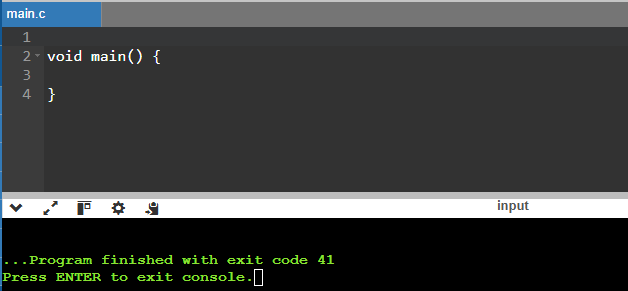
Every C program starts with a basic template:
void main() {

}
Every C program must have a main function, this is the entry point, it means that is the very first thing that runs when you execute your program. All the code you want to run goes inside its curly braces {}.
If you run this in onlineGDB, nothing will happen but there won’t be any errors either. That’s expected.
Libraries
In most programming languages, you can use libraries which is code written by others to solve common problems, so you don’t have to start from scratch.
In C, if you want to print something to the screen, you need the stdio.h library, which stands for Standard Input-Output Header. It gives you the ability to display messages in the console, among other things.
To include a library in C, add #include at the very top of your file, followed by the library name between angle brackets:
#include <stdio.h>

void main() {

}
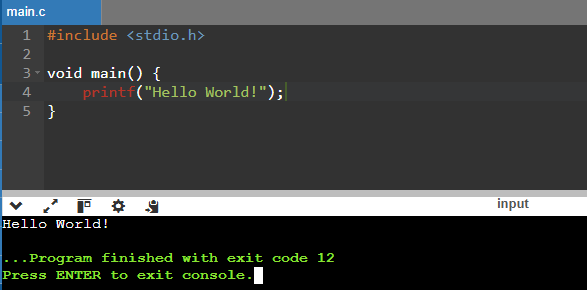
To print a message, use printf("Hello World!");
#include <stdio.h>

void main() {
    printf("Hello World!");
}
You should now see “Hello World!” displayed in the console.
Data Types
Most programming languages have a concept called data types. A data type tells the computer what kind of value something is and what operations are allowed on it.
This matters because computers treat text and numbers differently. You can add two numbers together, but trying to add a number and a piece of text will cause an error and crash your program.
Here are the primary data types in C:
| type | description | example |
|---|---|---|
| int | Stores whole numbers | Any number that does not have decimals EG: ... 1, 2, 3 ... |
| char | Stores single characters. | Any kind of character between SINGLE quotes but only one character EG: 'a', 'b' |
| float | Stores fractional numbers. | Any number with up to 7 decimal EG: 3.1415926 |
| double | Higher precision fractional numbers. | Any number with up to 15 decimal EG: 3.14159265358979 |
Static Typed Languages and Dynamic Typed Languages
Programming languages fall into two broad categories based on how they handle data types:
- Statically typed: Variable types are known and checked at compile time (before the program runs).
- Dynamically typed: Variable types are determined at runtime (while the program is running).
C is a statically typed language.
Naming Conventions
When writing code, you need names for things like variables and functions. The style you use to format multi-word names is called a naming convention.
Here are the most common naming conventions:
- snake_case - words separated by underscores:
my_initial_name - camelCase - first word lowercase, each following word capitalized:
myInitialName - PascalCase - every word starts with a capital letter:
MyInitialName
In C, the standard convention is snake_case.
Variables
Variables are how you store data in a program. You can save any kind of value in a variable and use it later.
Declaring a variable follows this structure: data_type variable_name = value
The = sign here doesn’t mean “equals” like in math. it means assign: store this value into this variable.
char my_initial_name = 'E';
int my_age = 16;
float my_money = 5.50;
double my_latitude = 18.650390;
double my_longitude = -88.399266;
To print a variable, you use format specifiers inside printf. The format specifier tells C how to display the value, and it depends on the data type:
| type | Format Specifier |
|---|---|
| int | %d or %i |
| char | %c |
| float | %f |
| double | %lf |
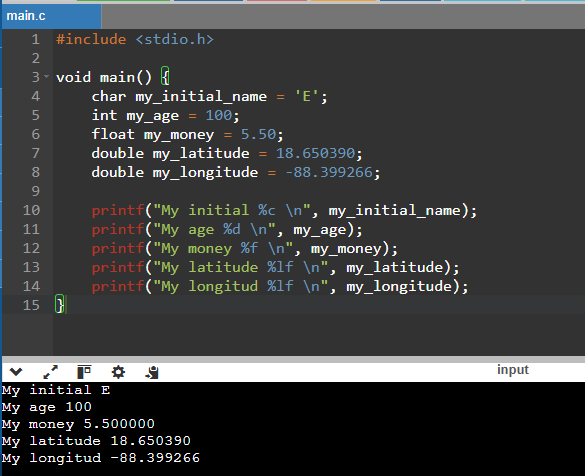
In the image below you will notice I have added \n inside the quotes. this is an escape character that inserts a line break, so each value prints on its own line instead of all running together.
Here’s how to print those variables:
#include <stdio.h>

void main() {
    char my_initial_name = 'E';
    int my_age = 100;
    float my_money = 5.50;
    double my_latitude = 18.650390;
    double my_longitude = -88.399266;

    printf("My initial %c \n", my_initial_name);
    printf("My age %d \n", my_age);
    printf("My money %f \n", my_money);
    printf("My latitude %lf \n", my_latitude);
    printf("My longitud %lf \n", my_longitude);
}
Each value now appears on its own line thanks to \n.
Constants
A constant is like a variable, but its value can never change after it’s set. You use the const keyword to declare one:
const int MAX_SPEED = 120;
const float PI = 3.14159;
If you try to change a constant later, the compiler will throw an error — which is exactly the point. Constants are useful when a value has a fixed meaning in your program and should never be modified by accident.
By convention, constants in C are written in ALL_CAPS with underscores between words. This makes them easy to spot in code.
Comments
A comment is a note you write inside your code that the computer completely ignores. It’s only there for humans — to explain what the code does, leave a reminder, or clarify a decision.
In C there are two ways to write a comment:
// This is a single-line comment — everything after // on this line is ignored

/* This is a
   multi-line comment */
Use comments to explain the why, not the what — the code itself already shows what it does:
int max_speed = 120; // legal highway limit in km/hYou’ll also see // used as a placeholder in code examples throughout this post, like // ... code goes here, to indicate where real code would go without showing the full implementation.
Continue: The Building Blocks of Programming 2